
It is nice when you discover something new and useful in a piece of software you’ve been using for years.
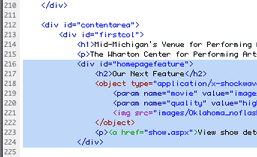
For instance, this past week I discovered that in the Code View in Dreamweaver MX, you can highlight a big block of code and tab the whole thing to the right, uniformly, by pressing TAB. You can also take away tab indents by pressing SHIFT+TAB.
Of course, hindsight 20/20 and all, this seems a perfectly reasonable feature. I just didn’t know it. So now I do. And, I’ve already used it half-a-dozen times.
It’s helpful when you move a whole block of code to a new location, and you want to adjust it’s indentation to fit the new surrounding code.